
Getting started, stage 1: how do I set up my clinic?
This is part of the Clinical Content System subscription. If your clinic isn't subscribed yet, you can see what the Clinical Content System includes.
Sound familiar?
"I've just signed up. What do I do first?" "I've done the first step in the email and I've got a bit more time. What's next?" "How long does setting up take?" Stage 1 is about telling the platform what your clinic does and what it wants to be known for. It takes about 15 minutes.
What's happening
Getting started has four stages, and this is the first:
- Set up your clinic: your services, conditions and priorities (this guide, about 15 minutes).
- Your clinicians: adding them, and their experience and qualifications (the first week or two).
- Your first piece: your content plan unlocks and your first piece is written.
- Publishing and keeping going: live on your website, then a steady rhythm.
Our emails take you one step at a time. This guide is here when you've got time to do more in one go 🚀.
Why it works this way
These two steps are the foundations of your whole subscription, not a box to tick. Your content plan is built from them: your practice priorities go first, then your top five services and top five conditions, in the order you set. The plan's analysis then decides the running order inside each one, but what gets built starts with what you tell us here. Ten minutes now shapes every piece we write for you.
What to do now
Step 1: rank your services and conditions (10 minutes)
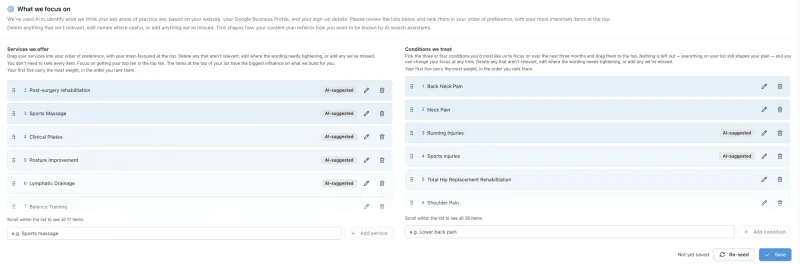
- Open your services and conditions: the What we focus on section at the top of your Clinic Profile, with Services we offer on the left and Conditions we treat on the right.
- We've proposed these from our assessment of your website. They're a starting point, not a finished list: you know your clinic far better than any assessment can, so please change them freely ✏️:
- Delete any that aren't relevant, or that you don't really offer.
- Combine any that are too similar to be separate.
- Split any that deserve their own entries (for example, one broad service that's really two or three you offer separately).
- Add anything that's missing.
- Put them in order, most important first, by dragging each one by its handle on the left. Your top three really must be your top three, then your top five. Use the pencil to reword one, the bin to delete it, and Add service or Add condition to add one.
- Press Save.
A list you've edited is far more valuable than one you've accepted as it came: every change tells the plan something true about your clinic.
Why your order matters so much: your ranking isn't a preference, it is your plan's order. Your plan has its own sections for your top five services and your top five conditions, in exactly the order you put them, and every top-five service and condition is guaranteed a place in it. Anything ranked sixth or lower still counts, but your clinicians' expertise decides where it goes. So if you'd love more patients for a particular service, put it near the top: that's how you tell the plan where to start.
Step 2: choose your practice priorities (5 minutes)
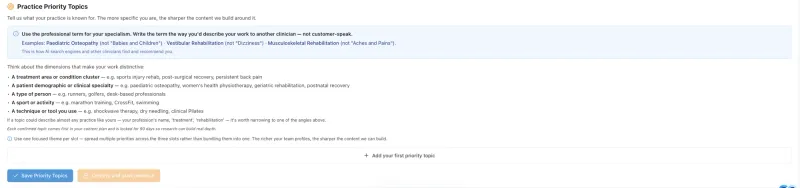
- Just below, open your practice priorities, the Practice Priority Topics section, and press Add your first priority topic.
- Choose up to three topics you most want your clinic to be known for, one focused theme per slot. Use the professional term, the way you'd describe it to another clinician: "Vestibular Rehabilitation", not "Dizziness". Think about what makes your work distinctive: a treatment area, a patient group, a type of person, a sport, or a technique you use.
- Press Save Priority Topics, then Confirm and start research.
Why your priorities matter so much: they're the strongest thing you can tell us, because they say where you want your clinic to go, not just where it is today. Each priority does three things 🔍:
- It gets deep research. We research the topic for your clinic: what patients are asking about it, what they need to know, and where nearby clinics are being named by AI tools while you're not.
- It goes to the top of your plan, above your top services and conditions. All three count equally.
- It's guaranteed a place, usually starting with the topic's main page, then the pages that support it, building real depth on the subject.
Choose carefully: once confirmed, each priority stays in place for 90 days while that research is done and the pages are built. A priority one of your clinicians also carries in their profile is the strongest of all, because Google and AI tools can see the expertise behind it. See "What do practice priorities actually do?".
That's stage 1 done ✅. Your clinic's foundations are set, and your content plan is built from them.
What's next: stage 2
Next comes the step that makes the biggest difference: adding your clinicians and filling in their profiles. See "Getting started, stage 2: how do we get our clinicians' profiles done?".
The question behind the question
"Do I really need to do this before anything gets written?" Yes, and it's quick. Without it, the plan would have to guess what matters most to you. With it, every piece is built around what your clinic does best.
The next question is usually...
- Getting started, stage 2: how do we get our clinicians' profiles done?
- What should I set up first on the Clinic Profile page?
- What do practice priorities actually do?
- I ranked my services and conditions by preference, but my content plan doesn't follow that order. Why?
Still stuck? This usually means...
- You can't find the Clinic Profile page. It's at https://content.co-kinetic.com/my-clinic/clinic-profile. If you're asked to sign in, you'll come straight back to it.
- The services or conditions list has things you don't treat. Remove them. Your plan follows this list, so it should only hold what you really do.
- You want to change a priority you've just set. See "Why are my practice priority topics locked for 90 days?".