Where is my website optimisation brief?
This is part of the Clinical Content System subscription. If your clinic isn't subscribed yet, you can see what the Clinical Content System includes.
Sound familiar?
"I was told there's a personalised optimisation guide, where do I find it?" "Where's the report about getting my website AI-ready?" "My developer needs the technical recommendations, what do I send them?" "Where do I get the WordPress plugin?" It is all in one place, and it is one click from your Overview page.
What's happening
Your website optimisation brief is a personalised document built for your practice from your AI Visibility Assessment. To open it:
- Go to your Overview page at https://content.co-kinetic.com/my-clinic/overview.
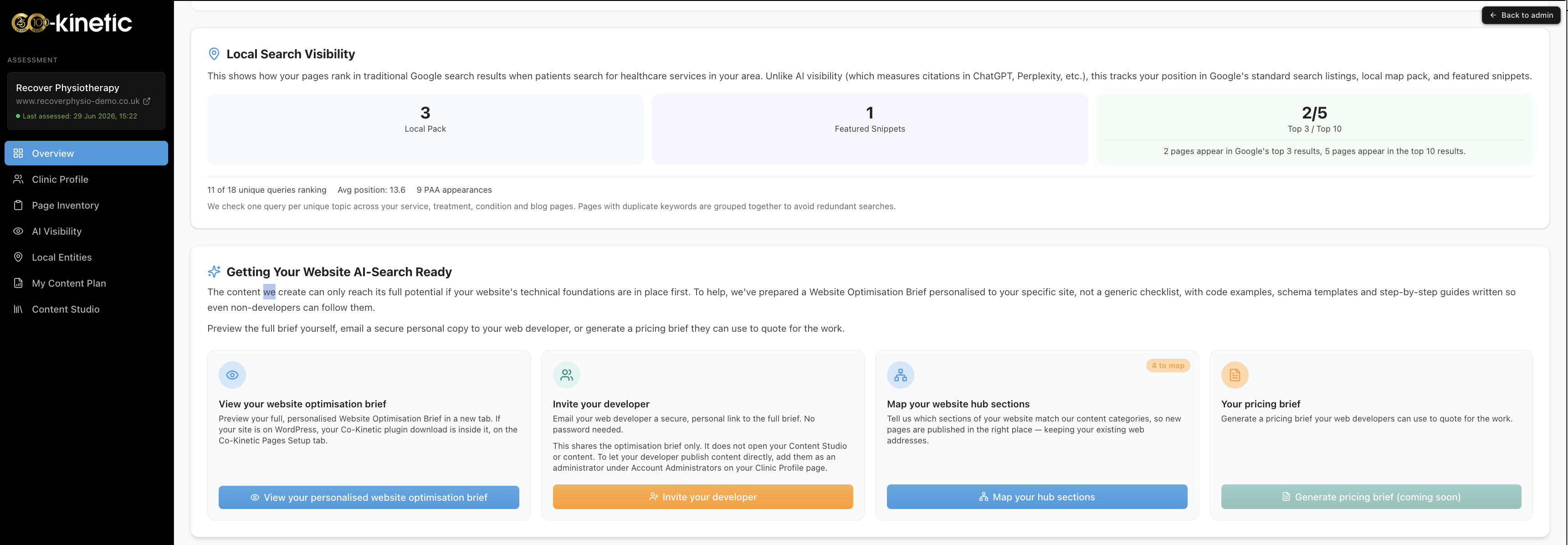
- Find the section called "Getting your website AI-search ready".
- Click the button "View your personalised website optimisation brief". The brief opens in a new tab 🗂️.
The brief has three tabs:
- Co-Kinetic Pages set-up. How to get the pages the platform creates for you working on your site. This is the part that connects directly to your subscription, and it is where you download the WordPress plugin customised for your practice (see "Where do I download the WordPress plugin?").
- Site-wide optimisation. Recommendations for improving your whole website for AI search, page by page and setting by setting.
- Marketing optimisation. Broader recommendations for how your site presents your practice to patients and to AI tools.
The same page is also where you can invite your developer (they get their own link to the brief) and map your website hub sections, and your practice details sit at the bottom, including the option to add your booking links.
Why it works this way
The last two tabs, Site-wide optimisation and Marketing optimisation, go beyond what your subscription covers: they are provided over and above, as a value-add. Acting on them is your practice's responsibility (or your developer's), not something the platform does for you. We include them anyway because it is in everyone's interest that your whole site is optimised 🚀. The content we create for you performs best when it sits on a site that is technically sound and clearly presented, so we give you the full picture rather than just the part we build.
Everything in the brief traces back to something your assessment actually measured on your site. It is not a generic checklist: it is your site's specific findings, turned into actions.
What to do now
- Open https://content.co-kinetic.com/my-clinic/overview and click "View your personalised website optimisation brief".
- Work through the Co-Kinetic Pages set-up tab first: that is the part that gets platform content flowing onto your site.
- If someone else looks after your website, use "Invite your developer" on the same page so they get the brief directly (see "How do I invite my developer to the optimisation brief?").
- Skim the other two tabs so you know what is there, then hand them to whoever manages your site.
The question behind the question
"Do I have to do all of this myself?" No. The Co-Kinetic Pages set-up tab is the only part needed to use the platform, and for WordPress sites the plugin does most of that work. The rest is a roadmap you can hand to a developer whenever you are ready, at whatever pace suits you 🙂.
The next question is usually...
- How do I invite my developer to the optimisation brief?
- Where do I download the WordPress plugin?
- What is the Overview page showing me?
Still stuck? This usually means...
- You cannot find the button. It lives on the Overview page at https://content.co-kinetic.com/my-clinic/overview, inside "Getting your website AI-search ready". If it is not there, tell us in the chat and we will check your account.
- The brief opened but you are not sure what applies to you. Start with the Co-Kinetic Pages set-up tab only; the other two tabs are optional extras for your developer.
- You do not have a developer and the technical tabs feel overwhelming. That is fine: do the Co-Kinetic Pages set-up, park the rest, and ask us in the chat which single site-wide item would matter most for your site.