What is the Overview page showing me?
This is part of the Clinical Content System subscription. If your clinic isn't subscribed yet, you can see what the Clinical Content System includes.
Sound familiar?
"I've logged in and I'm looking at a dashboard full of scores, what does it all mean?" "What's the difference between the two big numbers?" "Where do I start on this page?" "Where do I put our booking link?" The Overview page is your practice's home screen: here is a guided tour, top to bottom.
What's happening
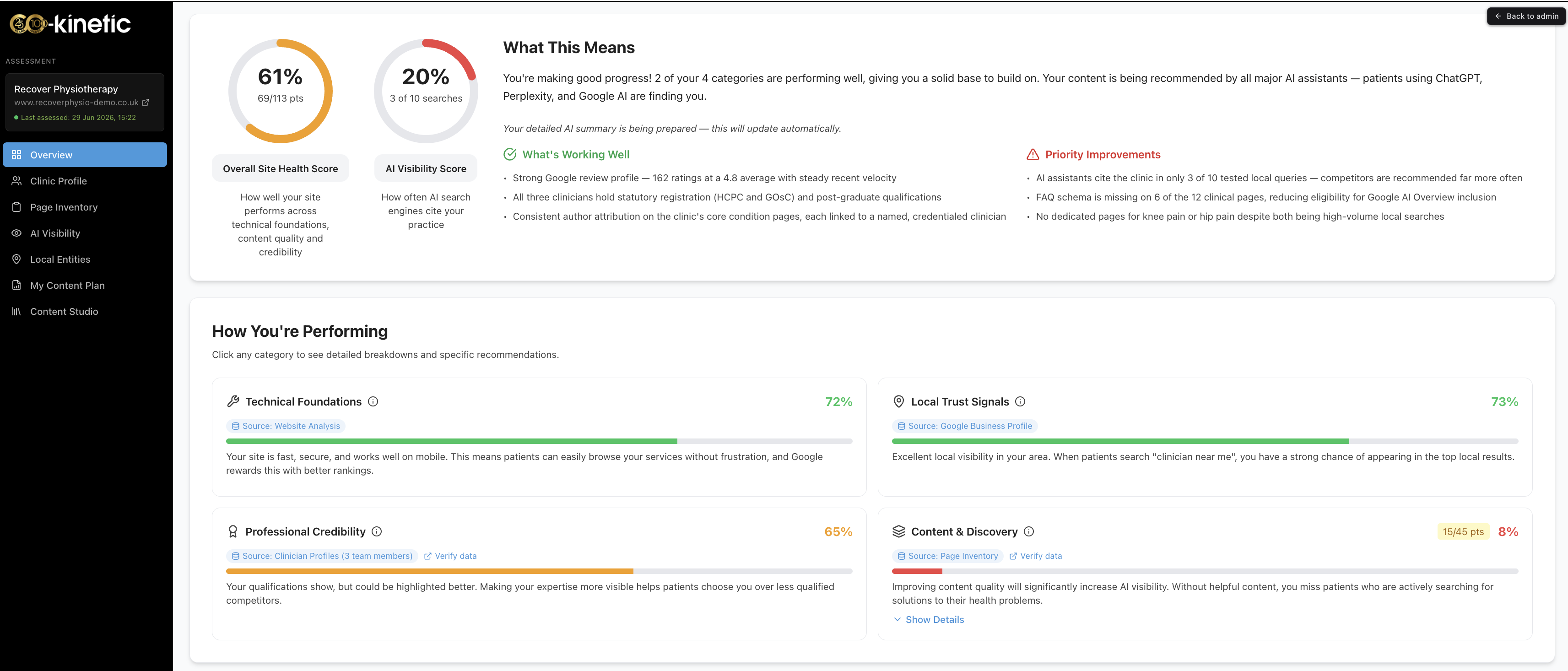
The Overview page at https://content.co-kinetic.com/my-clinic/overview is the summary of where your practice stands with AI search, built from your AI Visibility Assessment. It shows:
Two headline scores 📊
- Site Health: how strong your website is overall, as a percentage. It combines your performance across four categories (see below). The full story is in "What does my Site Health score mean?"
- AI Visibility: how often AI tools actually cite your clinic when patients ask real questions. The full story is in "What does my AI Visibility score actually mean?"
Four category percentages
Underneath the headlines sit four per-category scores: technical foundations, professional credibility, local trust signals, and content & discovery. Together these are what your Site Health combines.
"Getting your website AI-search ready"
This section holds the button "View your personalised website optimisation brief", which opens your practice-specific optimisation brief in a new tab. The same panel has cards to invite your developer and to map your website hub sections, and the brief is where you download the WordPress plugin. See "Where is my website optimisation brief?"
Practice details
At the bottom of the page sit your practice details, and this is where booking links can be added, so the content the platform creates can point patients at the right place to book 📅.
Why it works this way
The Overview is deliberately a summary, not the working area. The two headline numbers answer the two questions every practice owner actually has: "how good is my website?" (Site Health) and "is AI recommending us yet?" (AI Visibility). The four categories tell you where the gap is, and every number traces back to something the assessment genuinely measured on your site: nothing on this page is a guess.
What to do now
- Read your two headline scores, then look at the four categories to see which is lowest: that is usually where the biggest wins are.
- Open the optimisation brief from "Getting your website AI-search ready" and work through (or delegate) its Co-Kinetic Pages set-up tab.
- Scroll to practice details and add your booking links if they are missing.
- Then head to your plan at https://content.co-kinetic.com/my-clinic/plan: that is where the scores turn into actions.
The question behind the question
"Which number should I care about most?" AI Visibility is the outcome; Site Health is the engine. Work the plan and build depth in your key topics: that is the work that gives you the best chance of being named. Watching AI Visibility daily is like weighing yourself hourly 🙂: check it after each re-measure instead, and judge it over several measurements, not one.
The next question is usually...
- What does my Site Health score mean?
- What does my AI Visibility score actually mean?
- Where is my website optimisation brief?
- How is my content plan organised, and how does it decide what goes where?
Still stuck? This usually means...
- A score looks wrong or has not moved despite work on the site. Scores update when the site is re-measured, not the moment you change something. If a re-measure has happened and a number still looks off, tell us in the chat and we will look at the detail behind it.
- A section described here is missing from your page. Tell us in the chat: that is worth checking on your account rather than guessing.
- You are not sure what to do first. Optimisation brief (or invite your developer to it), booking links, then the plan, in that order.