What do practice priorities actually do?
This is part of the Clinical Content System subscription. If your clinic isn't subscribed yet, you can see what the Clinical Content System includes.
Sound familiar?
"I named priority topics during onboarding, what happened to them?" "What's the difference between a priority and a specialism?" "Do my priorities actually change the plan or are they just noted somewhere?" They change the plan in three concrete, visible ways. Here is the full mechanics.
What's happening
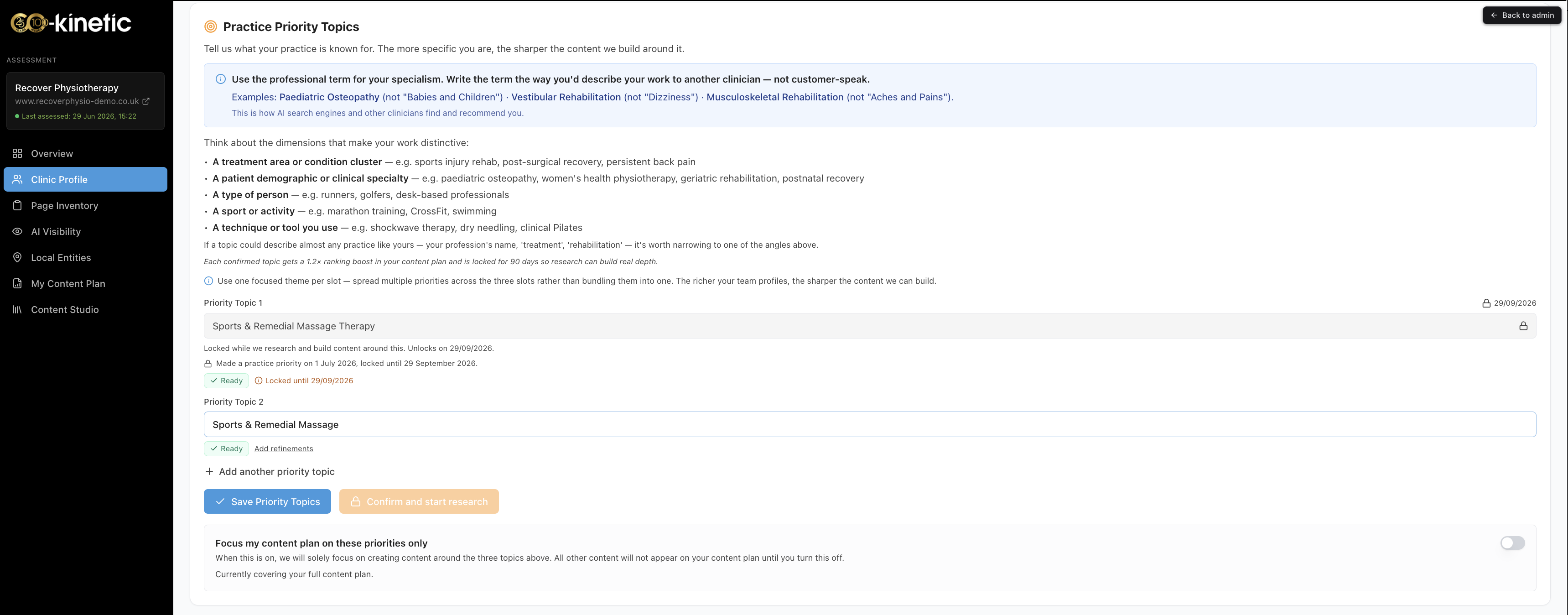
Your practice can declare up to three practice priority topics: the things you most want your clinic to be known for. They live in the Practice Priority Topics section of your Clinic Profile page at https://content.co-kinetic.com/my-clinic/clinic-profile (first set during onboarding), and they are one of the strongest inputs you control. Locked topics show their unlock date; an unlocked slot can be edited or added to right there: save, then press Confirm and start research. There is also a "Focus my content plan on these priorities only" switch on the same panel if you want the plan to concentrate entirely on your priorities for a while.
Declaring a priority does three things:
- The topic gets research treatment. It is properly researched for your practice, and it activates the matching topic area for your clinic, or reinforces it if a clinician's declared expertise had already activated it. From that point the topic area can produce plan actions: a hub page, its supporting pages, the lot.
- It goes to the top of your plan. Your priorities sit under the first heading on your plan, "Your Practice Priorities", above your top services, your top conditions and everything your clinicians carry. All three count equally; the plan does not rank one priority above another.
- Every priority is guaranteed a place. Each one gets at least one item, usually the topic's main page, before anything else is added. If something stops that, for example we published its main page for you recently, the plan gives it its best supporting article instead and says why.
Within a priority topic, the main page comes before the articles that support it, and your clinicians decide which of those comes first: starring a clinician lifts everything they treat, setting a single condition or technique to Boost lifts that item, and the more of your team who share a specialism the stronger it counts. No topic takes more than three places, so a priority gets depth without crowding out the rest of your plan.
Why it works this way
The plan is built from what you tell us first and what we can measure second. Priorities are the purest statement of intent you can give us: where you want the practice to go, not just where it is today. So they sit above everything else, and nothing outranks them. What the measured evidence still does is order the work inside a priority, which page first, which patient questions to answer, and where nearby clinics are being named by AI tools for that topic while you are not. Your intent decides what gets built; the evidence decides the running order.
How priorities differ from niches. Both activate topic areas, but they come from different places and do different jobs:
- A priority is declared by the practice: "we want to be known for this." Capped at three, sits at the top of the plan, and is guaranteed a place.
- A niche is declared by a clinician in their profile: "this is what I actually treat." Niches add your clinicians' own expertise to the plan, after your priorities and your top five services and conditions.
The strongest position for a topic is both at once: a declared priority that a clinician also carries as declared expertise. The full niche story is in "What are niches and primary niches, and how do they shape my plan?"
What to do now
- Open the Practice Priority Topics section at https://content.co-kinetic.com/my-clinic/clinic-profile and choose thoughtfully: pick the topics you genuinely want the practice known for, not just current volume. Use the professional term for the specialism, the way you would describe it to another clinician.
- Save, then press Confirm and start research. Confirming is what starts the research and the 90-day lock 💬.
- Open your plan at https://content.co-kinetic.com/my-clinic/plan and look under "Your Practice Priorities". Each item's "Why this is in your plan" explanation names the priority it serves.
- Make sure a clinician's profile backs each priority up (see the niches article): a priority your team visibly carries expertise in is a priority AI search can verify.
The question behind the question
"Why only three?" Because AI likes depth, not breadth, which is exactly why the platform narrows the focus. A priority is a claim about focus, and focus divided fifteen ways is not focus: three topics, each properly researched, given depth and guaranteed a place, will move your visibility further than a long list of half-priorities ever could. And three is not forever: when a priority's 90-day lock expires you can change it, so over a year you can build deep, lasting clusters on a whole series of topics 🙂.
If a topic matters but not enough to spend one of your three, the next lever down is your ranked services and conditions: every one of your top five services and top five conditions is also guaranteed a place, directly beneath your priorities.
The next question is usually...
- How do I push a topic up my content plan?
- What are niches and primary niches, and how do they shape my plan?
- How is my content plan organised, and how does it decide what goes where?
Still stuck? This usually means...
- A priority is missing from "Your Practice Priorities". Check it was actually confirmed, not just typed during onboarding. If it was, and it is still missing after a refresh, the plan records why; tell us in the chat with the topic name and we will show you.
- You want to change a priority. They lock for 90 days while their cluster is built. "Why are my practice priority topics locked for 90 days?" explains, including the admin-override route if one is genuinely wrong.
- Your priority topic still is not producing content. Make sure at least one clinician's profile carries that expertise, so there is someone to author it.