The suggested pages in my content plan aren't relevant to us. How do I change them?
This is part of the Clinical Content System subscription. If your clinic isn't subscribed yet, you can see what the Clinical Content System includes.
Sound familiar?
"The plan wants a page on a condition we don't really treat." "These suggestions feel like another clinic's plan." "Can I swap items out?" "If I reject something, will it just come back later?" You can change them, similar suggestions are held back for 90 days, and doing this is exactly how the plan is designed to be used.
What's happening
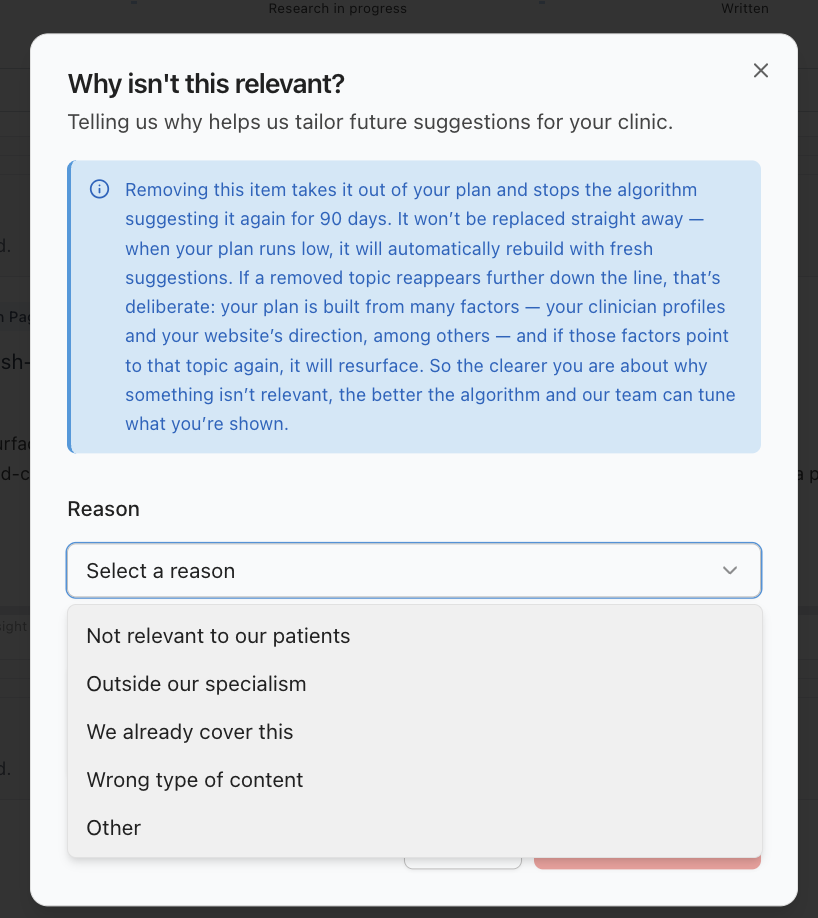
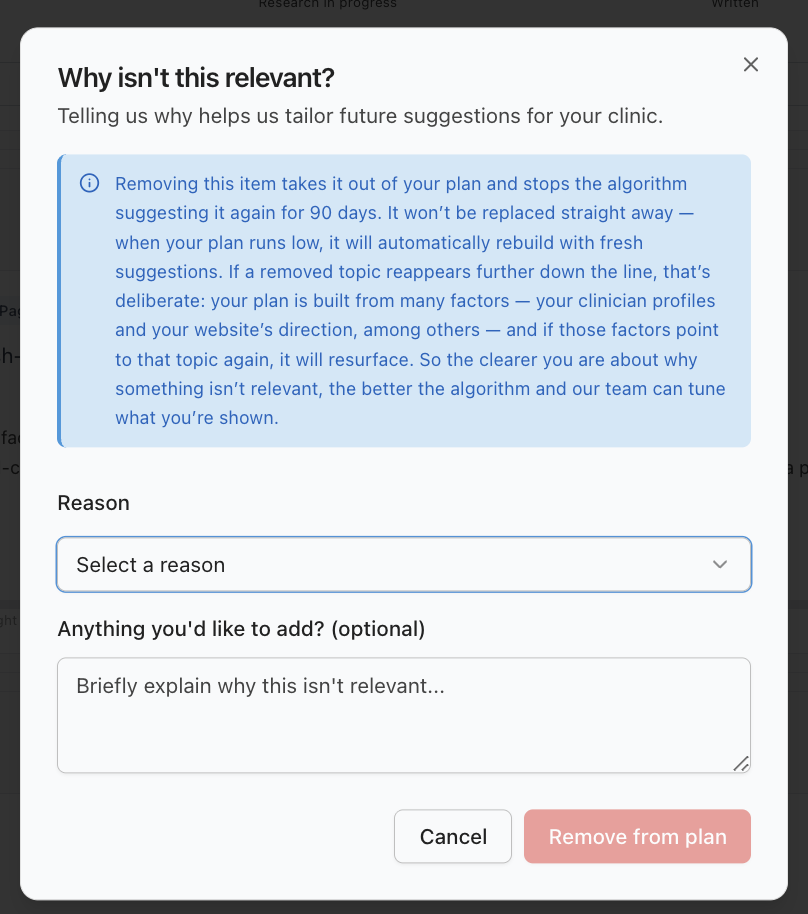
Every suggestion on your plan carries a small "Not relevant" link. Clicking it opens the "Why isn't this relevant?" dialog, and here is exactly what you will see:
- A reason to pick: Not relevant to our patients · Outside our specialism · We already cover this · Wrong type of content · Other. Pick whichever fits best; there is no wrong answer.
- An "anything you'd like to add?" box. Optional (required if you pick "Other"), and worth a sentence when there is context worth knowing. Whatever you write is kept, so it is worth a sentence when there is context worth knowing.
- Press "Remove from plan", and the item goes. The slot is not refilled instantly, but when your plan runs low (five or fewer actionable items), it quietly tops itself back up to the full 15 in the background, at most once a day. You may briefly see "Adding fresh suggestions…" while it happens.
You do not need to use this on work you have already done. A piece you have published comes off the plan by itself when the plan next rebuilds, as long as it has been recorded as published. Save "Not relevant" for things you do not want written at all.
Why it works this way
Your feedback changes the plan, in three specific ways:
- Some reasons clear siblings too. Certain reasons (the "we don't offer this at all" kind) also clear similar suggestions from the same topic group in one go, so you are not swatting the same idea five times.
- Rejections stick. Similar suggestions with the same reason are held back for 90 days, so you will not fight the same battle again, and if a topic ever resurfaces after that, rejecting it again takes seconds.
- Replacements are ranked, not random. When the plan rebuilds, the new suggestions are the next candidates in your own order of priority: your practice priorities first, then your ranked services and conditions, then what your clinicians can deliver.
The plan is meant to end up unmistakably yours, and "Not relevant" is the steering wheel.
What to do now
- Open your plan at https://content.co-kinetic.com/my-clinic/plan.
- On any suggestion that does not fit, click "Not relevant", pick the closest reason, and add a line in the box if there is context worth knowing.
- Carry on top to bottom with what remains; replacements arrive when the plan next rebuilds.
- Do this freely on a first pass. It is much better to spend two minutes steering now than to leave items you will never do sitting in your queue.
- If a whole run of suggestions feels wrong, the fix is usually upstream rather than item by item: check your practice priorities and your ranked services and conditions on the clinic profile page, because those are what the plan is built from, in that order.
- Want content on a specific topic the plan has not suggested? Requesting your own topic is coming soon. Until then, "How do I push a topic up my content plan?" shows how to get a topic into your plan.
The question behind the question
"Why did irrelevant suggestions appear at all?" Because the plan is composed from what you have told us and what we can measure: your priorities, your ranked services and conditions, your clinicians' declared expertise, your website, and real search demand. What only you know (a service you are winding down, a clinician who has changed focus, a condition you would rather not attract) reaches the plan through exactly this feedback. A few "Not relevants" on a first pass is the system working, not failing.
The next question is usually...
- How do I push a topic up my content plan?
- How is my content plan organised, and how does it decide what goes where?
- I ranked my services and conditions by preference, but my content plan doesn't follow that order. Why?
Still stuck? This usually means...
- A rejected suggestion seems to have come back quickly. Rejections hold similar suggestions back for 90 days, so a repeat inside that window should not happen. If you see one, tell us in the chat with the item title, we want to see it. (A topic returning much later can be deliberate: if your profiles and site evidence point at it again after the 90 days, it earns its way back.)
- You are rejecting a lot of items. A handful on a first pass is normal; a lot usually means the clinic profile page needs correcting: your priorities, your ranked services and conditions, and your clinicians' specialisms are the source the plan composes from.
- The replacement item is not relevant either. Keep rejecting with reasons. If the suggestions still don't fit after a couple of rounds, the fix is usually upstream on the clinic profile page, or tell us in the chat.