How do I stop a business being mentioned in my content?
This is part of the Clinical Content System subscription. If your clinic isn't subscribed yet, you can see what the Clinical Content System includes.
Sound familiar?
"An article mentioned a local gym we don't work with any more." "Why is a rival clinic's neighbourhood landmark showing up in our content?" "There's a local club I'd rather we didn't reference, can I block it?" Yes: local businesses and places can be switched off, and here is where.
What's happening
The platform keeps a list of local entities for your practice: the real businesses, clubs, landmarks and organisations in your area. You can see them on the Hyperlocal Content Intelligence page at https://content.co-kinetic.com/my-clinic/local-entities, organised by category. When articles are written for you, the relevant ones are offered to the writing as local context, to be used where they genuinely fit 📍.
To stop a specific business or club being used:
- Open https://content.co-kinetic.com/my-clinic/local-entities.
- Browse to the entity's category and find it in the list.
- Click the eye icon at the top right of that entity's card. The icon highlights to show the entity is excluded from future content. Click it again any time to bring it back.
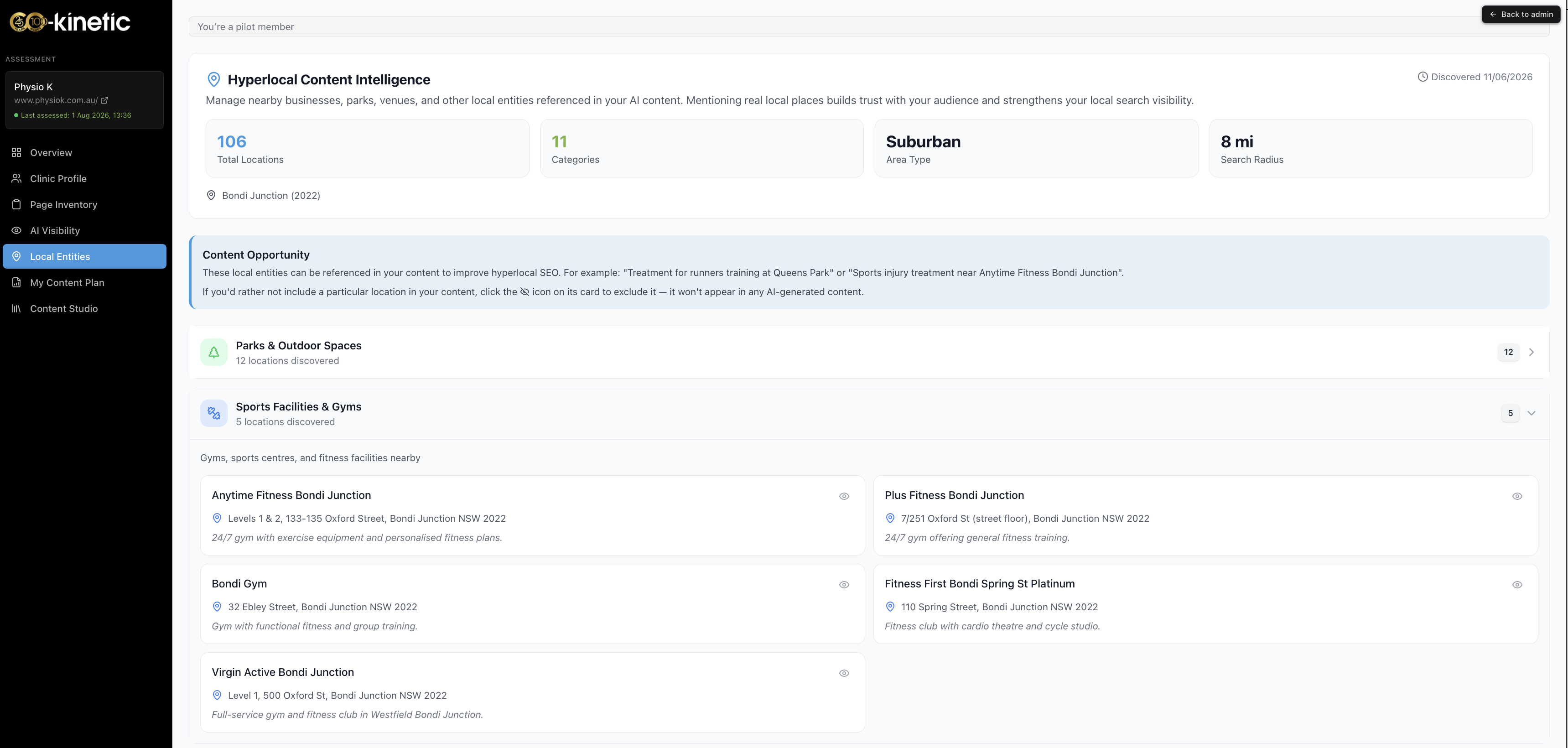

That is the whole job: from then on, new content will not use that entity.
Why it works this way
Localness is one of the signals that separates a real neighbourhood clinic from generic content. An article that mentions the actual running club, the actual leisure centre and the actual business park reads as authentically local to both patients and AI search engines, because it is. Generic "your local area" filler differentiates nobody.
But local knowledge cuts both ways: the platform can discover that an entity exists near you, and only you know that you no longer partner with that gym, or that the club has a complicated history with your practice. So the list is fully in your control: the platform proposes, you dispose 🙂.
What to do now
- Have a browse through https://content.co-kinetic.com/my-clinic/local-entities by category: it takes a few minutes and most practices only ever need to switch off one or two entries.
- Click the eye icon on anything you would not want appearing in an article with your clinic's name on it.
- If an article already generated with an unwanted mention, edit it before publishing in Content Studio at https://content.co-kinetic.com/my-clinic/studio: the block stops future use.
- Notice what is missing too: organisations you genuinely work with (the rugby club a clinician covers, a referral partner) are strong credibility material, and belong on the relevant clinician's profile under notable organisations.
The question behind the question
"Why are certain businesses being mentioned at all, how does that get chosen?" Local entities exist to boost your local search presence: they are real places discovered during your assessment as part of mapping your local landscape, and they are only ever woven in where they genuinely fit the context of what an article is saying, never dropped in for their own sake. Each mention does two jobs at once: it makes the article unmistakably yours (no other clinic's content mentions your actual running club), and it strengthens how your content performs in local search. The discovery is automated; the judgement about relationships is yours, which is exactly why the off switch exists ✅.
The next question is usually...
- Where do I find my content once it's created?
- What is my article score, and how is it measured?
- What is the Overview page showing me?
Still stuck? This usually means...
- You cannot find the entity in any category. If it is not in the list, it is not in the pool being used: if it appeared in an article anyway, tell us in the chat with the article and the mention and we will investigate.
- You blocked it but an existing draft still mentions it. The block applies to content generated from now on; edit the existing draft in Content Studio before publishing.
- You want to remove a mention of a person rather than a business. That is different machinery: tell us in the chat and we will sort it with you directly.