How do I invite my developer to the optimisation brief?
This is part of the Clinical Content System subscription. If your clinic isn't subscribed yet, you can see what the Clinical Content System includes.
Sound familiar?
"My web person looks after all this, can I just send it to them?" "How do I share the technical recommendations with my developer?" "I forwarded a screenshot of the brief, is there a better way?" "Did my developer ever actually look at the brief?" There is a built-in invite for exactly this, and it also tells you whether they have opened it.
What's happening
You do not need to copy anything or forward screenshots. Use the "Invite your developer" card on your Overview page:
- Go to your Overview page at https://content.co-kinetic.com/my-clinic/overview and find the panel "Getting Your Website AI-Search Ready".
- Find the "Invite your developer" card.
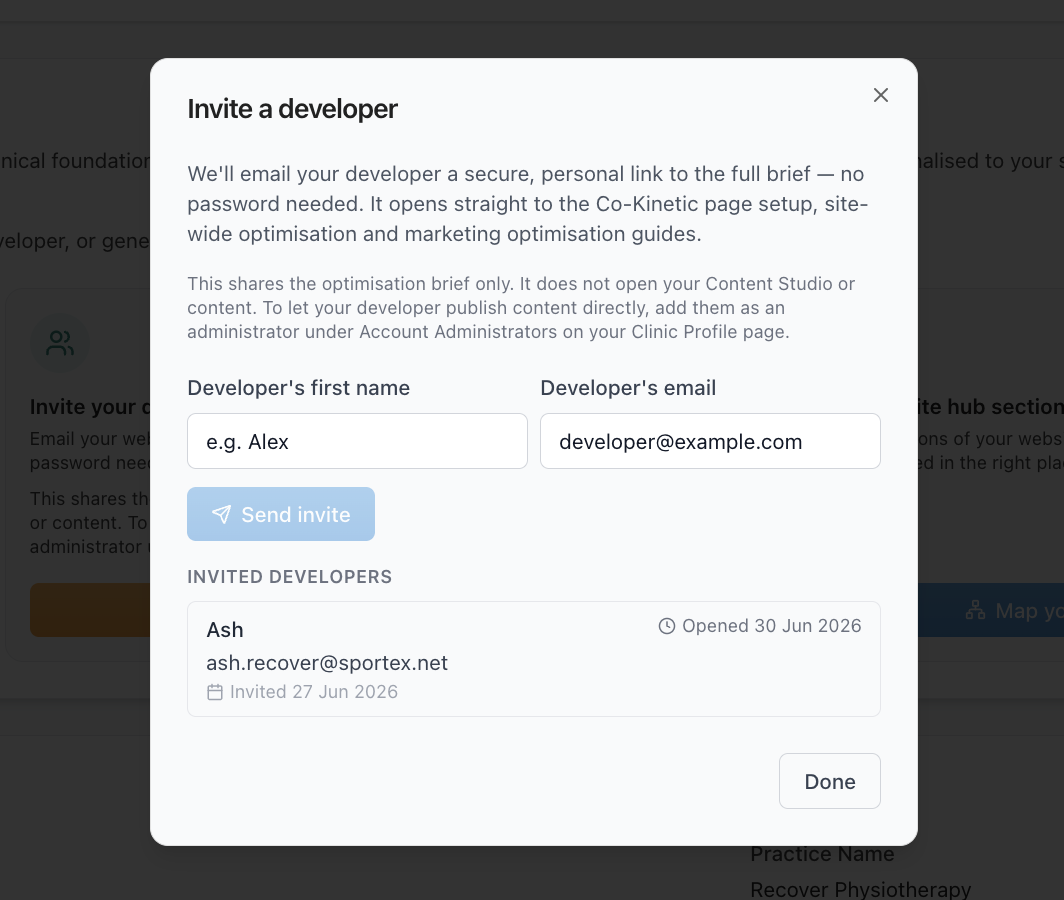
- Enter their name and email address and send the invite. They receive a link straight to your practice's brief 📨.
Once they are invited, you can also see whether and when your developer opened the brief. So you always know if it has actually been looked at, or is still sitting unopened in an inbox.
One boundary worth knowing: the invite gives your developer the website optimisation brief only. They cannot see or touch anything else, not your content plan, not your profiles, not your generated content. The only way to give someone access to the content system itself is the administrator route (see "How do I give someone administrator access?").
Why it works this way
The brief is personalised to your site, and parts of it are genuinely technical: schema, site-wide settings, page structure. Those recommendations land best with the person who actually maintains your website. Sending the live brief (rather than a copy) means your developer always sees the current version, with all three tabs: Co-Kinetic Pages set-up, Site-wide optimisation and Marketing optimisation.
The opened indicator exists because "I sent it to my web person" is where these things usually stall 🙂. If the brief has never been opened, you know to chase; if it was opened last Tuesday, you know the ball is in their court.
What to do now
- Open the brief from https://content.co-kinetic.com/my-clinic/overview.
- Use "Invite your developer": name, email, send.
- Check back after a few days: the brief page shows whether and when they opened it.
- Ask them to start with the Co-Kinetic Pages set-up tab (including installing the WordPress plugin if you are on WordPress, see "Where do I download the WordPress plugin?"), then work through the site-wide items as time allows.
The question behind the question
"Should I just invite my developer as an administrator instead?" We'd recommend not. Everything your developer needs is on the optimisation brief, that is exactly what it is for. The reason we keep the content system for your clinical team is that content creation asks for clinical insights at the moment you create each piece. Those insights are what make your content unique and give it real depth, and they have to come from a clinician's perspective, a non-clinician clicking the same buttons produces flatter, more generic content. Brief for the developer, content for the clinicians ✅.
The next question is usually...
- Where is my website optimisation brief?
- Where do I download the WordPress plugin?
- What is the Overview page showing me?
Still stuck? This usually means...
- Your developer says they never received the invite. Ask them to check spam first, then invite the same email address again: that sends a fresh link. If it still does not arrive, tell us in the chat with their email address and we will investigate.
- The link was clicked but nothing has happened on your site. The indicator tells you they opened it; the work itself is between you and your developer. A specific ask ("please do the Co-Kinetic Pages set-up tab first") gets much faster results than "please look at this".
- You do not have a developer. For WordPress sites, the plugin plus its setup guide is designed so a non-technical person can follow it. If you get stuck partway, tell us in the chat and we will point you at the exact next step.