How do I add a new team member?
This is part of the Clinical Content System subscription. If your clinic isn't subscribed yet, you can see what the Clinical Content System includes.
Sound familiar?
"We've hired a new physio, how do I get her onto the platform?" "Where's the add clinician button?" "What happens after I add someone, do they get an email?" "How does a new starter get their profile set up?" One button starts it, and then their profile journey begins.
What's happening
To add a clinician:
- Open the Clinic Profile page at https://content.co-kinetic.com/my-clinic/clinic-profile.
- Find the Your Team panel.
- Click the "Add team member" button at the top right of the panel ➕.
- Enter their details, then send them their personal, secure profile-edit link from their new team card 📨: no password needed, and the link stays valid for seven days.
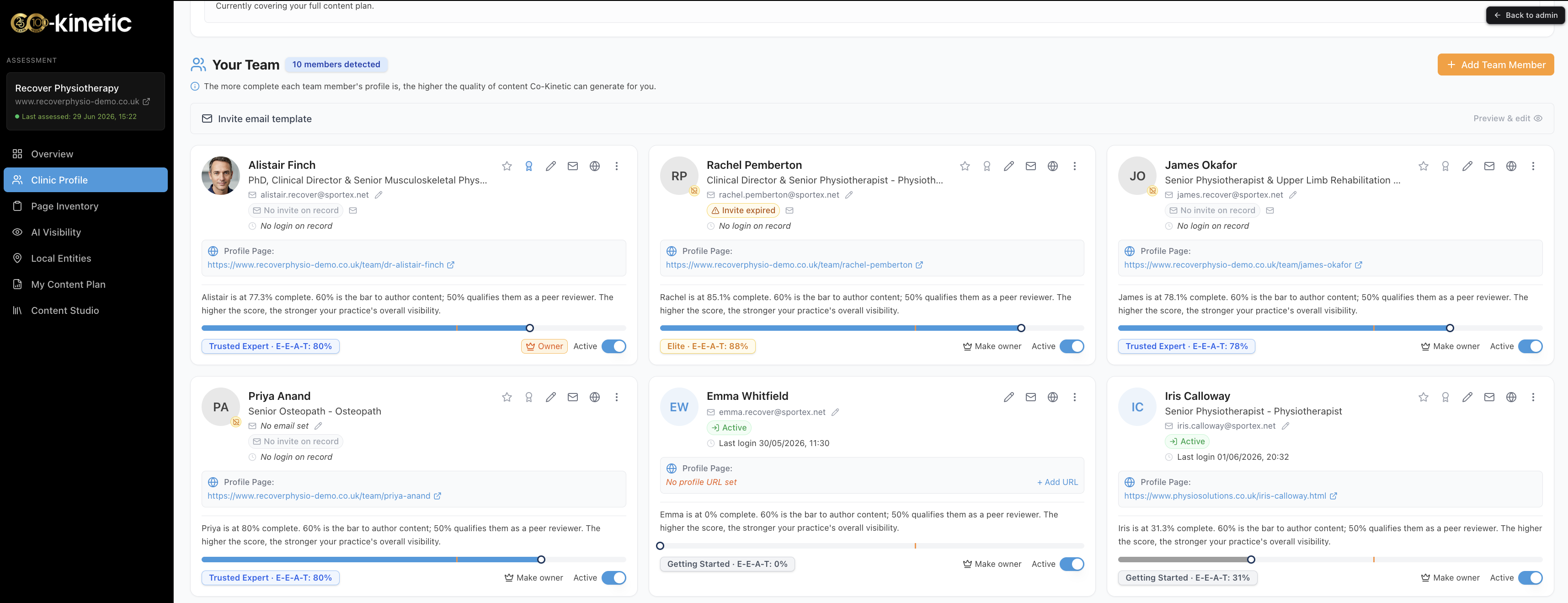
Once they are on the team, their row gives you the full set of controls: open and edit their profile, email them their profile link if they have lost it, star them to prioritise their content, add their profile to your website via Embed and Share, view or copy or share their live profile link, toggle them active or inactive, make them the owner, or remove them from the clinic.
Why it works this way
A new clinician is not just a name on a list: their profile is raw material for your visibility. Their declared niches activate topic areas for your clinic, their completed profile qualifies them to author and review content, and their name and registration on your pages show patients who is behind your content. That is why adding someone immediately opens a profile journey rather than just creating a login: the value starts when the profile is filled in 🚀.
The thresholds worth knowing: at 50%+ profile completeness they can be a named clinical reviewer; at 60%+ they can author content.
What to do now
- Click "Add team member" (top right of Your Team) at https://content.co-kinetic.com/my-clinic/clinic-profile and enter their details.
- Tell them to expect the email with their personal profile link, and to open it within seven days.
- Point them at the fast routes before they type anything: they can import from a CV, their LinkedIn, an existing staff bio page, or a completed worksheet. "Is there a faster way to fill in clinician profiles?" covers all five routes and the downloadable guides.
- Encourage them to open the "Fill in the gaps" bar at the top of their editor: it lists the biggest remaining point wins, biggest first (see "How are profile scores worked out, and how do I raise mine?").
- When their profile is strong, get it onto your own website via their row's add-to-website action, which takes you to Embed and Share 🙂.
The next question is usually...
- Is there a faster way to fill in clinician profiles?
- How are profile scores worked out, and how do I raise mine?
- What does starring a clinician do?
- Why does my clinician's profile matter so much?
Still stuck? This usually means...
- The new team member never got their profile link. Check spam first, then send it again from their team card (available until they have activated their access; after that they log in at https://content.co-kinetic.com/login). Still nothing? Tell us in the chat with their email address.
- They opened the editor but froze at the open questions. Send them the clinical voice preparation guide and the interview guides (experienced, early-career): each link downloads a Word document straight to their computer: they exist for exactly this person.
- You meant to add a non-clinical person. Practice managers and admin staff go in the administrators section below the team instead: see "How do I give someone administrator access?"