A clinician is going on long-term leave, what should I do?
This is part of the Clinical Content System subscription. If your clinic isn't subscribed yet, you can see what the Clinical Content System includes.
Sound familiar?
A clinician is going to be away for a long stretch, maternity leave, long-term sick leave, a sabbatical, and you are wondering what to do with them in the system. Should you remove them? Delete their profile? Will the plan keep suggesting content for someone who is not here? The answer to all of it: do not remove or delete anything. There is a switch built for exactly this.
What's happening
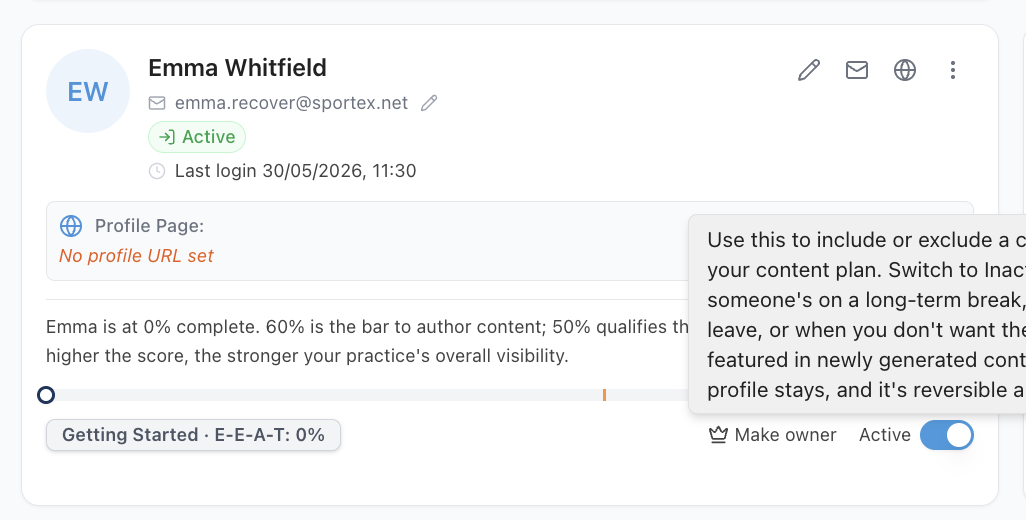
In the Your Team panel on the Clinic Profile page at https://content.co-kinetic.com/my-clinic/clinic-profile, every clinician has an active/inactive toggle. For long-term leave, toggle them inactive 🔄.
While a clinician is inactive:
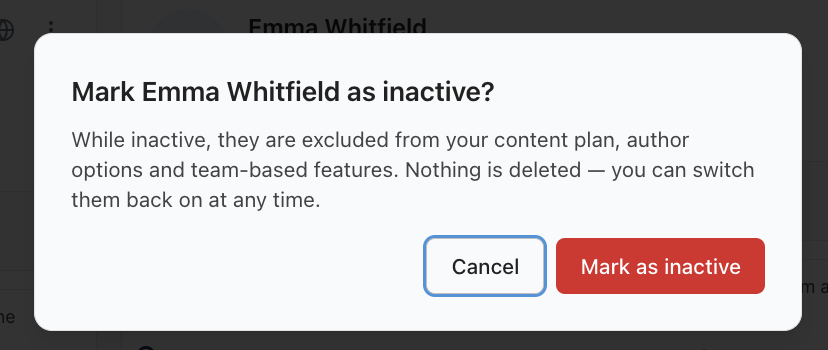
- Their niches, specialisms and content influence are temporarily paused from the content plan, so the plan stops building content around expertise that is not currently available to patients.
- Nothing is removed or changed on your clinic's actual website. The platform does not touch your live site: your own website is yours to update (or not) as you see fit while they are away.
- Their profile and everything in it is kept intact. Nothing is deleted.
They stay in the team section of your Clinic Profile, faded, with their Active switch off, listed after your active clinicians. So you can always find them. (The "members detected" count only counts active clinicians.)
When they come back, switch them active again from the same place and everything resumes exactly as before. It is fully reversible.
Two things the platform will check with you on the way: if deactivating someone would leave you with no active clinician in a discipline, or none at all, it asks you to confirm first, so nothing is switched off by accident. And one practical note: the content plan needs two active clinicians to stay available, so if the leave takes you below two, the plan pauses and resumes automatically when a second clinician is active again.
Why it works this way
The content plan builds your visibility around the expertise patients can actually book. If a vestibular specialist is away for a year, filling the plan with vestibular content that no one can currently deliver would spend your effort in the wrong place. Pausing (rather than removing) keeps the plan honest without destroying anything: the moment they return, their expertise flows straight back into the plan with their profile, niches and history untouched 🙂.
What to do now
- Open https://content.co-kinetic.com/my-clinic/clinic-profile and find the clinician in the Your Team panel.
- Toggle them inactive. That is the whole job: do not use "remove from clinic" for leave, that is for people who have actually left.
- If you like, update your own website's team page to reflect the leave: that side is yours to manage, and the platform will not have changed it.
- On their return, toggle them active again. If their return also changes who should be prioritised, see "What does starring a clinician do?"
Leaving permanently, not on leave? Then "remove from clinic" is the right action, but do one thing first, and it matters: make sure the email address on their profile is a personal one, not a clinic address. A clinician's profile belongs to them, and it travels with them 🧳. All the work they put into it is kept, and removing them from your clinic just takes them off your team, it never deletes their profile. If they join another practice that uses Co-Kinetic, get in touch and we will reassign their profile to the new subscription. The personal email address is how they keep hold of it, so update it before they go. (Already left with a clinic address still on the profile? Have them get in touch with us in the chat and we will update it for them.)
The question behind the question
"Will deactivating them undo the work we put into their profile?" No. The profile, its score, its niches and everything they wrote are all preserved exactly as they were. Inactive is a pause button, not an eraser ✅.
The next question is usually...
- What does starring a clinician do?
- How do I add a new team member?
- Why does my clinician's profile matter so much?
- How do I give someone administrator access?
Still stuck? This usually means...
- The person has left permanently, not gone on leave. Then "remove from clinic" is the right action, but first change their profile email to a personal address so their profile goes with them (see "Leaving permanently?" above). If in doubt, toggle inactive first and remove later.
- You hit a warning while deactivating. That is the platform checking you know what the change does (last active clinician of a discipline, or last active clinician full stop). Proceed if that genuinely is the situation: it stays fully reversible.
- Their specialism is central to your practice and the plan now feels thin. Consider whether another team member carries (or could declare) that niche, or raise the topic as a practice priority: see "How do I push a topic up my content plan?"